
Assemble a Test Set
Bundle ground-truth documents into a versioned evaluation set used by manual and scheduled benchmarking runs.
A test set is the input to a benchmark — the curated list of documents you want a model to extract from when you ask "how good is this model on this kind of doc?".
You'll typically have a few test sets per Document Type: a small smoke set (3–5 docs, runs in seconds, used while iterating on a schema), a regression set (15–30 docs covering edge cases that have bitten you before), and maybe a broad benchmark set (50+ docs across vendors, formats, and quirks) for big "should we switch models?" decisions.
What you'll need
- A Document Type — the test set is scoped to one.
- A handful of Ground Truth Documents of that type. You can publish a test set before its documents have any published Ground Truth Responses — but to actually run the set against a given schema version, each document needs a published response for that version's schema type (see Schedule Recurring Tests).
Walkthrough
1. Open Test Sets
Navigate to /admin/collections/test-sets. The header reads Test Sets with the description: A curated set of ground truth documents for a specific document type.
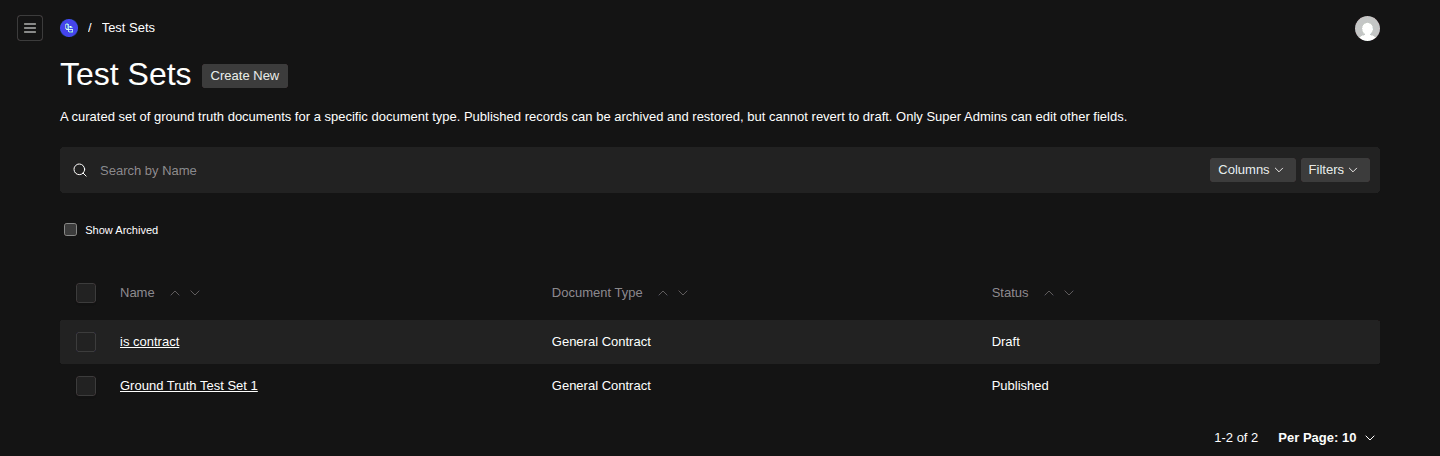
- Create New button
- Document Type column
- Status column (Draft vs Published)
2. Create a new test set
Click Create New. The form opens as a Draft.
3. Name and scope it
Give the test set a short, descriptive name — e.g. MSA smoke v1 or Invoice broad benchmark Q2. Pick the Document Type. Once you do, the document picker filters to documents of that type.
4. Add documents
Pick the ground-truth documents to include. Naming convention tip: include the spread of variations you actually care about — short and long, scanned and digital-native, edge cases and the boring middle. A homogeneous test set produces homogeneous (over-confident) numbers.
5. Save and publish
Save as Draft. Once you're happy with the membership, set status to Published. Only Published test sets appear in Run a Manual Test and Schedule Recurring Tests selectors.
Publishing a test set no longer waits on its ground-truth responses — you can publish the set first and fill in responses later. (Whether a specific schema version can run against it is decided separately, at run time.)
Shared published responses
The test set detail screen has a panel titled Shared Published Ground Truth Responses. It lists the responses that every selected ground-truth document has a published version of — in other words, the schema types this whole set is ready to be benchmarked against. If a document is missing a published response for a given schema type, that type won't show up here, and the set won't be runnable against a schema version of that type until you fill the gap.
It updates live as you add or remove documents, so it's a quick way to answer "is this set actually ready to run?" before you wire up a scheduled run.
Versioning behaviour
Test Sets follow the same Draft → Published → Archived workflow as schemas and prompts. Once published, a non-super-admin can't edit the membership. To change the lineup, archive the old set and publish a new one — historical results stay attached to the version of the test set they ran against, which is exactly what you want for trend analysis.
How big should a test set be?
There's no universal answer, but a few rules of thumb:
- Smoke set: 3–5 documents. Goal: "is this completely broken?" Runs in under a minute, used dozens of times a day while iterating.
- Regression set: 15–30 documents. Goal: "have any of the bugs we previously fixed come back?" Runs in a few minutes; worth running on every meaningful schema or prompt change.
- Broad benchmark set: 50+ documents. Goal: "which model should we run in production?" Runs cost real money on commercial models — schedule it weekly, not per-edit.
Related
- Run a Manual Test — point a manual run at this test set.
- Schedule Recurring Tests — run it on a cron.
- View Test Analytics — see how the runs scored.
Define Expected Responses for Ground Truth
Capture the human-verified correct extraction for a ground-truth document × Request Schema Type pair, so models can be scored against the right answer.
Run a Manual Test
Benchmark a Request Schema Version against one or many model deployments on demand, then compare accuracy, cost, and latency side by side.