
Manage Extraction API Keys
Create and revoke bearer tokens for the public /api/extract endpoint your applications call to get structured data out of documents.
The Extract API is the production interface to Librari Evals. Your application sends it a document and a Request Schema Version ID; it returns structured JSON. To call it, you need an API key — a bearer token, gated to specific schema versions if you choose, and revocable.
What you'll need
- A published Request Schema Version you intend to call against.
- A clear sense of which application will use this key. One key per app is the right granularity — easier to rotate and audit.
Walkthrough
1. Open API Keys
Go to /admin/collections/tenant-api-keys. The header reads API Keys with an important warning right below: the full key is shown once immediately after creation; only the last 4 characters are kept after that.
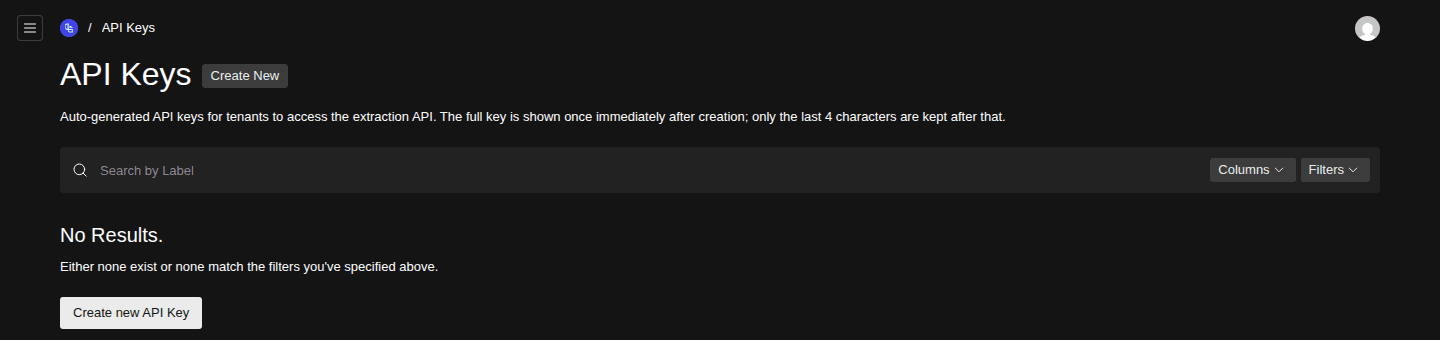
- Create New button
- Description warning that full keys are only shown once
2. Create a new key
Click Create New. Give it a meaningful Label — something like contract-parser-prod or marketing-site-form-handler, not my-key. Future you will thank present you.
3. Copy the full key — once
Save. The system generates a long opaque string and shows it to you immediately, once. After this screen, only the last 4 characters are stored — there is no way to retrieve the full key again.
4. Use it as a Bearer token
Pass the key in the
Authorizationheader of every call to/api/extract, which takes amultipart/form-databody withfile,requestSchemaVersionId, andmodelDeploymentId:curl -X POST https://your-host/api/extract \ -H "Authorization: Bearer <your-key>" \ -F "file=@/path/to/document.pdf" \ -F "requestSchemaVersionId=<schema-version-uuid>" \ -F "modelDeploymentId=<deployment-uuid>"The same key also authorizes
POST /api/ocr— the separate OCR step for scanned PDFs.See Call the Extract API for the full request / response contract, Python and TypeScript examples, the text-layer requirement, and the error table.
Each call is logged against your usage and shows up in Explore Costs under the Extract API operation type.
5. Revoke when retired
To kill a key, delete its record from the API Keys list. Revocation takes effect immediately — the next call returns a 401.
Rotate keys when an employee leaves, when a key has been in production for 12 months, or any time you suspect leakage. Rotation is "create a new key, deploy it, then delete the old one" — there's no in-place rotate.
Scoping a key
An API key is scoped to your account — it can only access data and schemas you own. By default it can call the Extract API against any schema version you own.
Related
- Call the Extract API — what to actually do with the key once you've copied it.
- Build a Request Schema — the schema version the API call extracts against.
- Manage LLM Provider API Keys — these are the other set of keys: yours-for-the-providers, not yours-for-the-app.
- Explore Costs — how to see what your app spent.