
Export a Schema as LangChain JSON
Grab the JSON-schema representation of a published Request Schema Version for use in your own LangChain pipeline.
Already happy with how a Request Schema Version extracts data inside Librari Evals, and want to wire the same definition into your own LangChain pipeline? You don't have to retype anything. Every published schema version exposes a ready-to-paste pair of artifacts: the base prompt and the JSON Schema that drives withStructuredOutput.
What you'll get
Two copy-able blocks, both pinned to the version you're looking at:
- Base Prompt — the system prompt the model sees before any field-specific instructions. Pair it with your own user message in LangChain.
- Structured Output Schema (JSON) — a JSON Schema describing every field the schema version expects, with
type,format, and per-fielddescriptionstrings the model uses to disambiguate.
Walkthrough
1. Open the Request Schema Versions list
Go to /admin/collections/request-schema-versions. You'll see one row per version per Request Schema Type — the table shows the Request Schema Type, Version Number, Base Prompt Version, and Status. The Base Prompt Version column shows the actual prompt text inline, truncated with an ellipsis, so you can tell versions apart without opening each one.
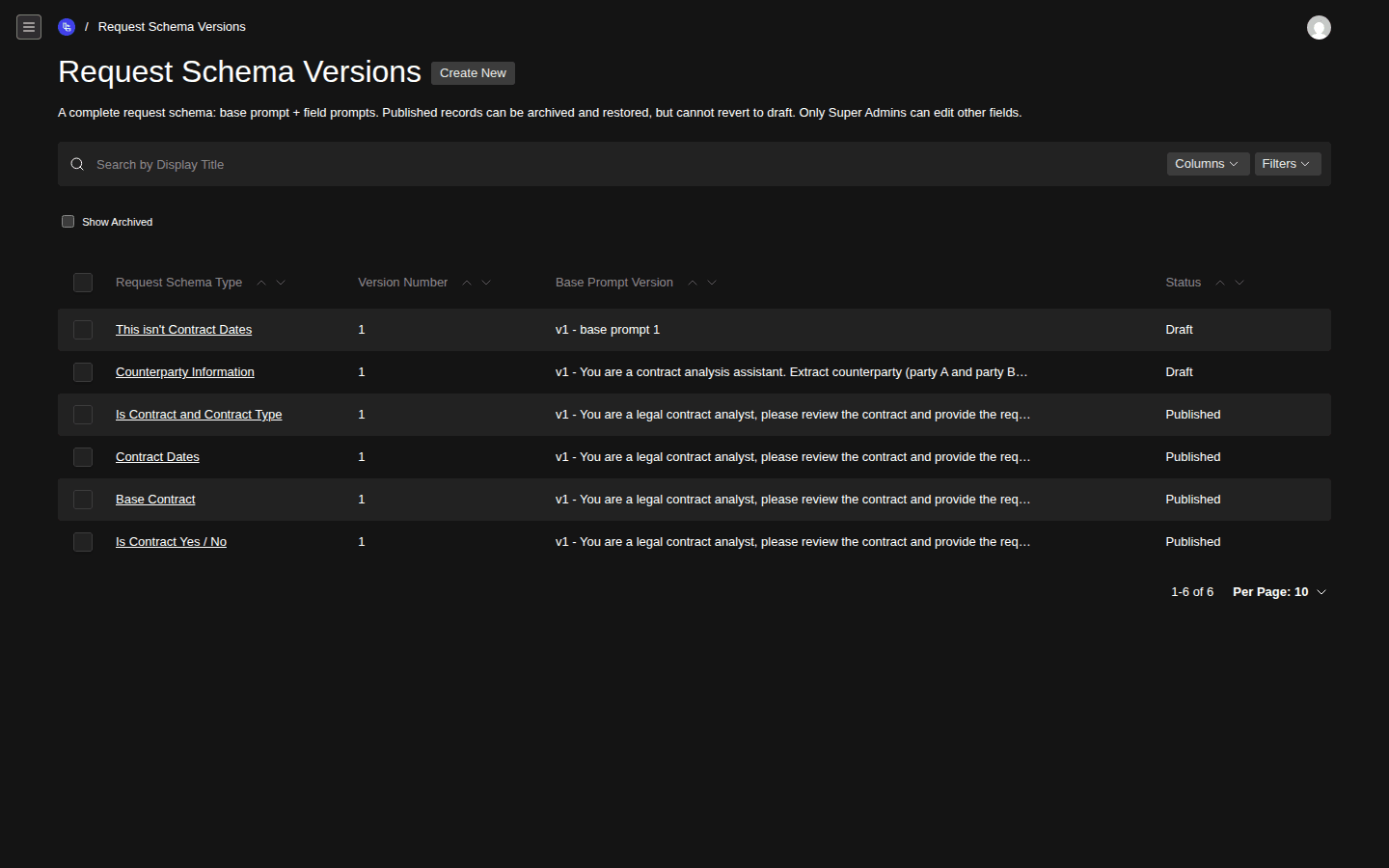
- Schema Type column
- Base Prompt Version column with inline preview
- Status column (Draft / Published)
2. Click into a Published version
Pick the version you want to export and click its row. Drafts have an export too, but if you're going to point production code at a JSON Schema, point it at a Published version.
3. Switch to the LangChain Schema tab
The version detail page has three tabs: Edit, API, and LangChain Schema. Click LangChain Schema.
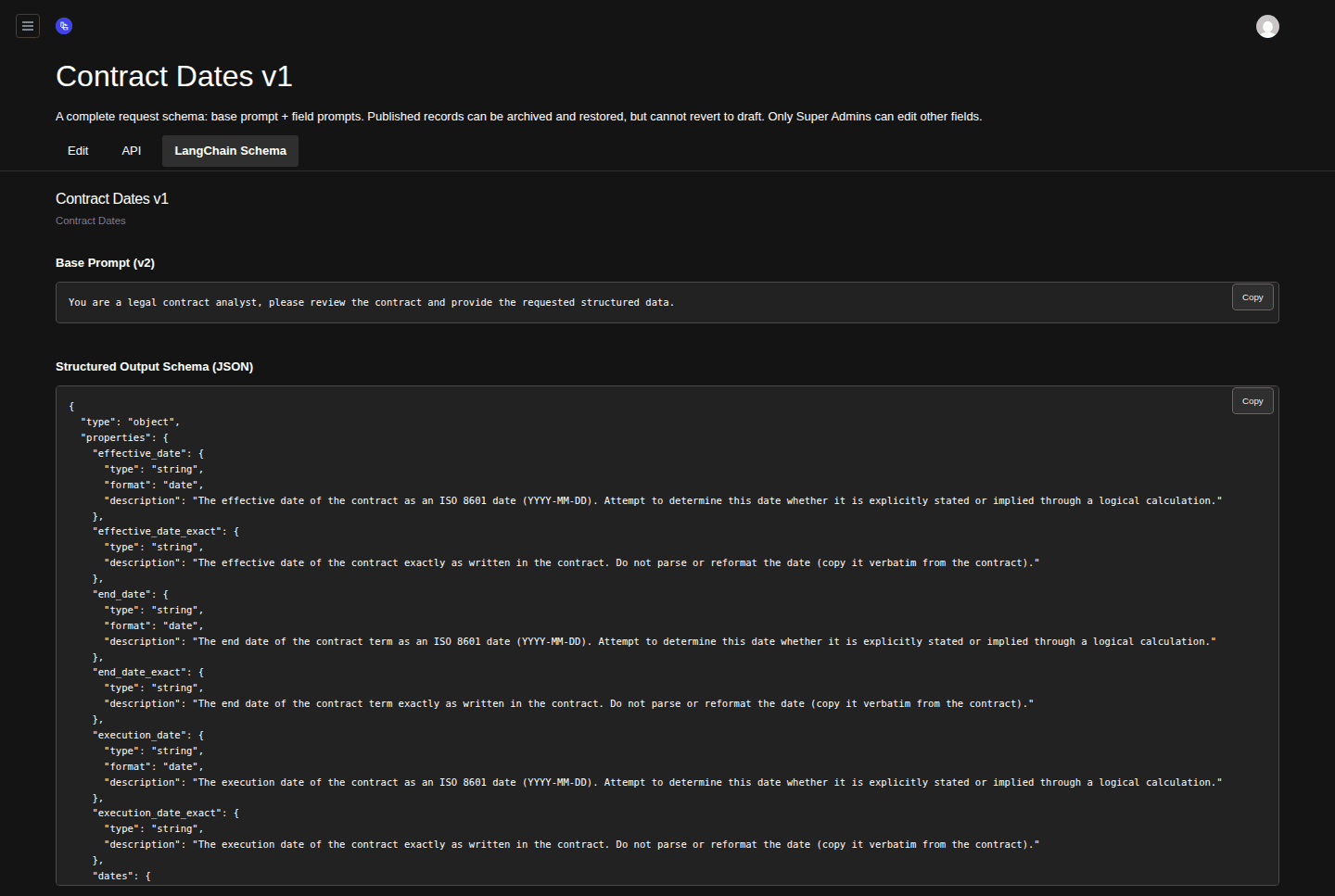
- LangChain Schema tab (active)
- Base Prompt block with Copy button
- Structured Output Schema (JSON) block with Copy button
4. Copy the base prompt
Click Copy on the Base Prompt (v1) block. This is what you'll set as the system message in your LangChain
ChatPromptTemplate.5. Copy the JSON Schema
Click Copy on the Structured Output Schema (JSON) block. This is what you pass to
model.withStructuredOutput(schema)(or the equivalent in your stack).
Plugging it in
In a typical LangChain Python or TypeScript setup:
from langchain_core.prompts import ChatPromptTemplate
from langchain_openai import ChatOpenAI

base_prompt = """<paste the Base Prompt block>"""
schema = { "type": "object", "properties": {...} }  # paste the JSON Schema block

prompt = ChatPromptTemplate.from_messages([
    ("system", base_prompt),
    ("human", "{document_text}"),
])

model = ChatOpenAI(model="gpt-5.4").with_structured_output(schema)
chain = prompt | model
The JSON Schema includes every field's description string verbatim from the field-prompt versions, so the model has the same per-field guidance it gets when the schema runs inside Librari Evals.
Notes
- The export reflects the version you're looking at. Open a different version to export a different snapshot — they're all immutable.
- The base prompt is the version pointed to by this Request Schema Version, not the latest base prompt for the parent Document Type. Switching base prompts means creating a new Request Schema Version.
- Field types map straightforwardly:
string,integer,decimal→number,boolean,date→stringwithformat: "date",enum→stringwithenum: [...],object→ nestedobject,array→array.
Related
- Build a Request Schema — make the schema you're now exporting.
- Manage Extraction API Keys — if you want Librari Evals to do the extraction call for you instead of running it in your own LangChain code.